 how-to
Optimize Real Estate Photos for Fast Website Loading
Table of Contents
- Why Image Optimization Matters for Real Estate Websites
- Step 1: Determine the Right Real Estate Website Image Size
- Step 2: Choose the Best Image Format for Real Estate Websites
- Step 3: Compress Real Estate Photos for Websites Without Quality Loss
- Step 4: Implement Lazy Loading for Property Photos
- Step 5: Optimize Metadata and Filenames for SEO
- Step 6: Test and Monitor Real Estate Photo Performance
- Common Mistakes to Avoid When Optimizing Property Images
- Frequently Asked Questions
Last Updated: October 21, 2026
Why Image Optimization Matters for Real Estate Websites
To optimize real estate photos for fast loading is the foundation of a successful real estate listing. When potential buyers visit a property website, they expect photos to load instantly. Slow images frustrate visitors and drive them away before they even see your home's best features.
To optimize real estate photos is the process of reducing file size while maintaining visual quality. This balance matters because large, unoptimized photos slow down your entire website. Search engines like Google penalize slow sites in their rankings, which means fewer buyers find your listings.
Optimized images can transform listing performance. Agents who implement these techniques often report faster page loads and longer visitor engagement times. The technical work is straightforward once you know the steps.
Here's what you'll learn below:
- How to choose the right image dimensions for web display
- Which formats work best for property photos
- Compression techniques that preserve visual quality
- How to implement lazy loading for faster performance
- Metadata and filename optimization for SEO
- Testing and monitoring tools to track improvements
Step 1: Determine the Right Real Estate Website Image Size
The correct image size depends on where the photo will display on your website. Most property listing sites use images between 800 and 1200 pixels wide for desktop browsers. Mobile devices need smaller versions to load quickly on cellular networks.
Start by measuring the space where your photos will appear. If your listing template displays images at 1000 pixels wide on desktop, export your photos at that width. Don't export larger and let the browser shrink them, that wastes bandwidth and slows page load time.
Here are common dimensions for real estate websites:
- Hero image (main photo): 1200 pixels wide, 800 pixels tall
- Gallery thumbnails: 400 pixels wide, 300 pixels tall
- Mobile hero image: 600 pixels wide, 400 pixels tall
- MLS portal images: 800 pixels wide, 600 pixels tall
Different MLS systems and real estate portals have specific requirements. Check with your brokerage about their preferred dimensions before editing. Using the exact dimensions they request prevents awkward cropping or stretching.
Step 2: Choose the Best Image Format for Real Estate Websites
The image format you choose affects both file size and visual quality. Three main formats dominate real estate photography: JPEG, PNG, and modern formats like WebP. Each has specific advantages for property listings.
JPEG vs. PNG for Property Listings
JPEG is the industry standard for real estate photos. It compresses photographic images effectively while maintaining excellent color and detail. Most MLS systems and real estate portals accept JPEG files. File sizes typically range from 100 to 300 kilobytes per image, depending on compression settings.
PNG works better for graphics with text or sharp lines. Property floor plans and diagrams often use PNG format. However, PNG files are larger than JPEG for photographic images, so use PNG only when you need transparency or lossless compression.
For property photos, JPEG is your default choice. The format handles the color gradations and lighting variations in interior and exterior shots better than PNG. Most browsers display JPEGs instantly across all devices.
Modern Formats: WebP and AVIF
WebP is a modern format developed by Google that offers better compression than JPEG. WebP files are typically 25 to 35 percent smaller than equivalent JPEGs while maintaining visual quality (WebP Compression Study). Many newer websites use WebP for faster loading.
AVIF is an even newer format with superior compression. However, older browsers don't support AVIF yet, so you need a fallback format for compatibility.
When using modern formats, provide a JPEG backup. Use HTML code that displays WebP or AVIF on supported browsers and falls back to JPEG on older systems. This approach gives you the speed benefits of modern formats without losing visitors on incompatible devices.
Many real estate websites and MLS portals still require JPEG submission. Check your destination portal's requirements before exporting in modern formats. If they don't accept WebP or AVIF, stick with JPEG to ensure your photos upload without errors.
Step 3: Compress Real Estate Photos for Websites Without Quality Loss
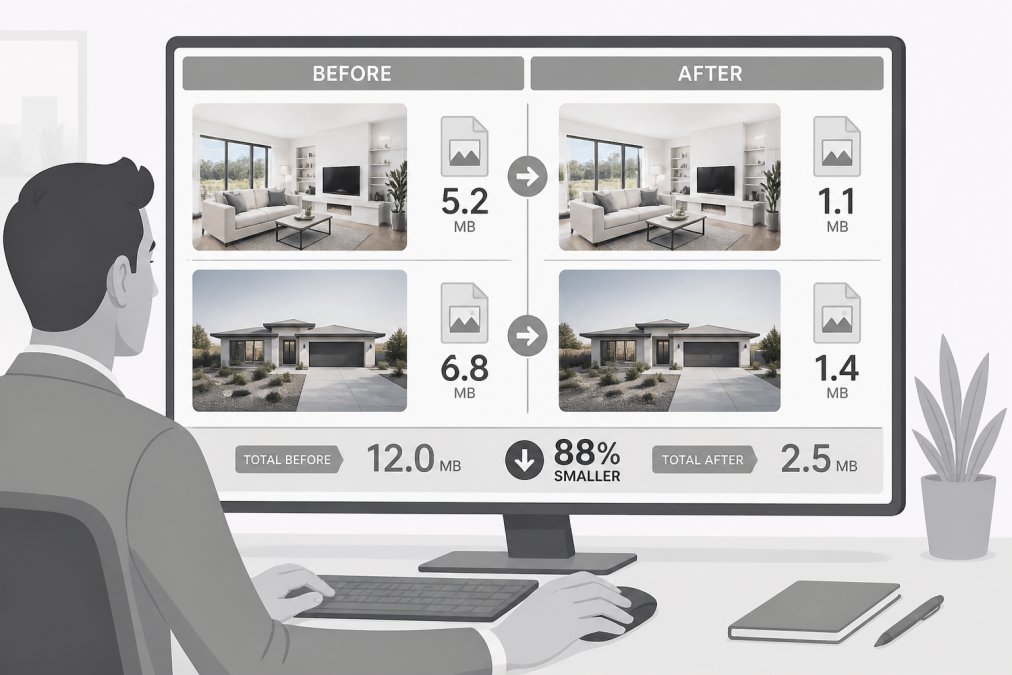
Image compression reduces file size by removing unnecessary data. Two compression types exist: lossy and lossless. Lossy compression removes some visual information to achieve smaller files. Lossless compression reduces file size without discarding data.
For real estate photos, lossy compression is standard. A JPEG compressed at 75 to 85 percent quality looks virtually identical to the original while cutting file size by half or more. The human eye rarely detects the difference at these quality levels.
Export your images using these compression settings:
- JPEG quality: 80 percent (balances quality and file size)
- Target file size: 150 to 250 kilobytes per image
- Progressive JPEG: Enable this option for faster perceived load times
Many photo editors offer export presets for web. Use "Export for Web" or "Save for Web" options in Adobe Lightroom, Photoshop, or free tools. These presets apply optimized compression automatically.
Test your compressed images on different devices. Open them on a phone, tablet, and desktop computer. If they look sharp and detailed, your compression settings are correct. If you see visible degradation, increase the quality setting.
Step 4: Implement Lazy Loading for Property Photos
Lazy loading delays image download until the visitor scrolls to that section of the page. Instead of loading all 20 photos at once, the browser loads only the images currently visible. As the visitor scrolls down, new images load automatically.
This technique dramatically improves initial page load speed. A listing page with 20 photos loads in seconds instead of 30 seconds or more. Visitors see content faster and stay on your page longer.
Most modern website platforms support lazy loading natively. WordPress, Shopify, and custom real estate sites can all implement it. Check your platform's documentation or contact your web developer to enable lazy loading.
If your site uses HTML, add this attribute to each image:
 The `loading="lazy"` attribute tells the browser to load the image only when needed. This simple addition can reduce initial page load time by 40 to 50 percent on photo-heavy pages.
For critical images like the main hero photo, use loading="eager" to load them immediately. Reserve lazy loading for gallery thumbnails and secondary photos.
Step 5: Optimize Metadata and Filenames for SEO
Search engines use image filenames and metadata to understand what your photos show. A descriptive filename helps Google index your images and display them in image search results.
Instead of naming files "DSC_0001.jpg" or "photo123.jpg," use descriptive names:
- ✓ "luxury-master-bedroom-with-fireplace.jpg"
- ✓ "open-kitchen-granite-countertops.jpg"
- ✓ "backyard-pool-patio-seating.jpg"
- ✗ "image1.jpg"
- ✗ "photo.jpg"
Descriptive filenames tell both search engines and visitors what the image contains. Include the property address or neighborhood when relevant.
Add alt text to every image. Alt text describes the image for people using screen readers and for search engines when images fail to load. Write 8 to 12 words describing what's visible:
- "Master bedroom with king bed, fireplace, and large windows overlooking garden"
- "Stainless steel kitchen appliances and white subway tile backsplash"
Include relevant keywords naturally in alt text, but don't stuff keywords. Write alt text that accurately describes the image first. SEO benefits follow naturally from accurate descriptions.
Step 6: Test and Monitor Real Estate Photo Performance
After optimizing your images, measure the results. Use free tools to check your page load speed and identify remaining bottlenecks.
Google PageSpeed Insights analyzes your website and reports how images affect performance. It shows which images are too large and suggests optimization opportunities. Visit pagespeed.web.dev and enter your listing URL.
Core Web Vitals measure three key performance metrics:
- Largest Contentful Paint (LCP): How fast the largest image or text block loads (target: under 2.5 seconds)
- First Input Delay (FID): How quickly the page responds to clicks (target: under 100 milliseconds)
- Cumulative Layout Shift (CLS): How much the page layout shifts as images load (target: under 0.1)
Images significantly impact LCP and CLS. Optimized, properly sized images improve all three metrics. Monitor these scores monthly to catch performance issues early.
Test your listings on different devices and internet speeds. Use your phone's 4G network, not just WiFi. Slow connections reveal image optimization problems that fast connections mask. If photos load slowly on 4G, they'll frustrate many potential buyers.
Common Mistakes to Avoid When Optimizing Property Images
Many real estate professionals optimize images incorrectly, negating the benefits. Avoid these common pitfalls:
Exporting at excessive resolution. Some agents export photos at 4000 pixels wide "just in case." These massive files slow everything down. Stick to the web dimensions you actually need. You can always re-edit if requirements change.
Ignoring MLS requirements. Different MLS systems have specific image specifications. Some require JPEG format, specific dimensions, or maximum file sizes. Check your MLS portal before optimizing. Non-compliant images may be rejected or automatically resized, wasting your optimization work.
Over-compressing and losing detail. Pushing JPEG compression below 70 percent creates visible artifacts. The savings aren't worth the damage to image quality. Professional photos deserve quality settings that preserve their value.
Using the same image for desktop and mobile. Desktop-sized images load slowly on phones. Create mobile-optimized versions at appropriate dimensions. Most website platforms handle this automatically with responsive image code.
Forgetting alt text. Alt text helps search engines understand your images and improves accessibility. It also displays if an image fails to load. Never skip this step.
Not testing on actual devices. Optimizations that look good in your editor may perform differently on phones or older computers. Always test on the devices your buyers actually use.
Optimizing real estate photos isn't complicated once you understand the core principles: choose the right dimensions, select appropriate formats, compress without sacrificing quality, and test your results. These steps work together to create fast-loading listings that keep buyers engaged.
The professional photography you invest in deserves optimization that showcases it properly. At Desert Home Photography, we capture stunning property images with hand-blended editing that highlights each home's unique character. When combined with technical optimization, those photos load instantly and convert more browsers into buyers.
Frequently Asked Questions
What image size should real estate photos be for a website?
Most property listing websites display hero images at 1200-1600 pixels wide on desktop. For mobile responsiveness, use 600-800 pixels. MLS systems typically accept images up to 1024×768 pixels or larger, but check your specific portal requirements. Thumbnail gallery images can be 300-500 pixels wide. Always export at 72 DPI for web display; higher DPI adds file size without visual benefit on screens.
How do you compress real estate photos for websites without losing quality?
Use lossy compression tools that reduce file size while preserving visual detail. Export JPEG files at 75-85% quality, which is imperceptible to viewers but cuts file size by 50-70%. For PNG images, use lossless compression or modern formats like WebP, which compress 25-35% smaller than JPEG at the same quality. Test exports at different quality levels to find your threshold before uploading to your listing platform.
What image format is best for real estate websites?
JPEG is the standard for property photos because it balances quality and file size. PNG works for images requiring transparency but creates larger files. WebP and AVIF are modern formats that compress 25-35% smaller than JPEG with better quality retention; use these if your website supports them. Check your MLS portal and real estate website platform to confirm which formats they accept before exporting.
Should you lazy-load property photos on real estate listings?
Yes. Lazy loading defers image loading until users scroll near them, reducing initial page load time by 30-50%. This improves Core Web Vitals and user experience, especially on mobile devices with slower connections. Implement lazy loading using the loading='lazy' HTML attribute or JavaScript libraries. Ensure above-the-fold images (hero photos) load immediately, and lazy-load gallery and secondary images below the fold.